[学习笔记] - Observability
Observability = Logging + Monitoring + Tracing + Visualization
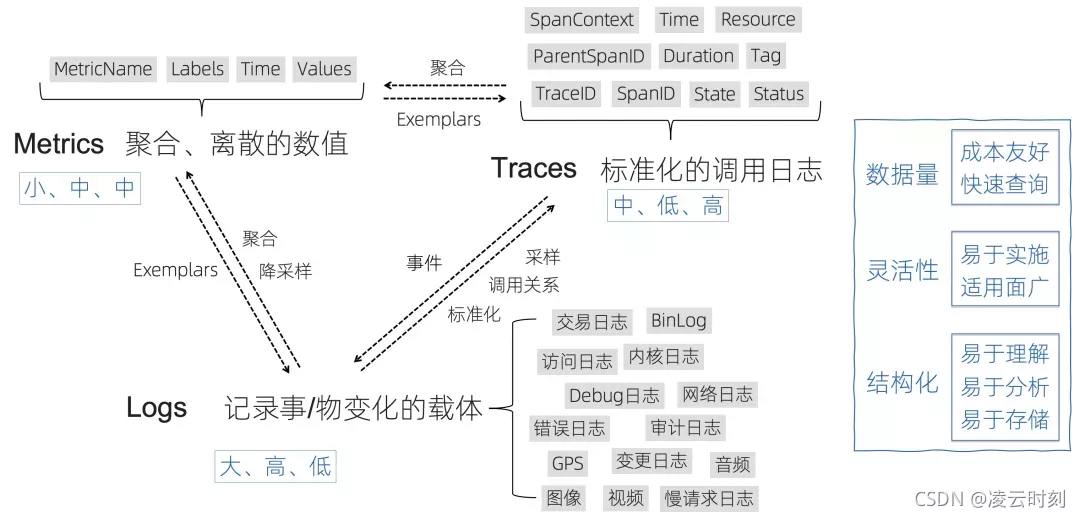
Logging
What is logging? Put simply, logging is just a fancy word to define a process of writing down everything you do. So why is logging difficult? To answer this question, first we need to know what is important about logging. For example:
- where to save
- storage type
- retention period
- what to log
- level
- info
- how to query
- realtime
- fast
- who can see
So not just what to write down, the management, the permission, the structure. When we talk about logging we should always remember those things.
Why logging
We should explain why this is such a big deal. You see, development is complex. when we build, tests may fail in CI, when we do QA, the tests may also fail, even in production, something can go wrong and developers need to fix the problem. If we want to know what happened, we need to log. for example, we may need information below.
- The exact date and time the problem occurred.
- In which part of the application the problem happened.
- Details about the user session in the application.
- The stack trace of the error or exception that occurred.
Log
We use logs to specifically describe an event that takes place in our system. Logs are made up of entries created by applications. An entry is the quantum unit of logging. The message carried by the log entry is called the payload. payload can be a simple string or structured data. example log entry can include metadata of compute engine instance.
So we can take Log like below
- timestamp
- tags
- message
- json
- infra metadata
- level
there are also many types of logs.
- Application Logs
- System Logs
- Audit logs
Collection
How we collect logs, well firstly, why do we need to collect the logs?
Simply, putting all of the logs you generate into a single place gives you the ability to do useful things with them
In the previous, we may just output it to the file system. like /var/logs/server.log, and download the logs file if we need. But this may cause lots of problem in today when we using Cloud. The instance will wipe the data after you replace it, and you cannot analyze the logs in real time if the logs are on the cloud machine. If the server is down, you even cannot login into the server to get logs to see what happened. And most important, we don’t have just one instance.
So we need a way to collect the logs into a central place. To collect something, we have two ways
- push
- pull
For batch collection we usually choose pull, but if we want it in real time, we would better choose push. When we choose push, there are still two ways to push.
- use proxy: like rsyslog, agent
- use client directly send the logs
This usually depends on your environment and needs. If you have an SRE team that manages all logs first and then redirects them somewhere, it’s better to have an agent since it can do some operation at the agent level. and if you use client, you may need to set up the infra at app repo level may cause some other operation costs but give you more options.
Store
We have many way to save logs.
- Text files
- Database
- Cloud services
Choose which is depends on the costs, the operation to query, also may related the law. Basically we just archive it into S3 or something like that.
Sink
Sometimes we may not want logs output to just one place, then we need sinks. Sinks control how Cloud Logging routes logs. By using sinks, you can route some or all of your logs to supported destinations, or exclude log entries from being stored in Logging. A sink includes a destination and a filter that selects the log entries to route.
- Route
- Filter
Sampling
we have lots of access logs, for example when we get the money from one user, the server will log the access, but this kind of logs has few valuable information, and will cost a lot of money sending/storing them, so before we really send the log, we can sample them. If the status_code == OK, then we drop the log by probability(like 99%), this is very important in microservice because one service will call another service just get a little data, and if one endpoint like post page need get data from 10 services, and the services will also need get data from 1-3 services, then the number of logs will become very huge in short time costs lots of money and hard to find useful information.
This can be done at application level or at the agent level. but if you want to control it in more detail, it’s better to do it at application level.
Log Explorer
we need a way to query logs, usually in current cloud computing, we call it log explorer, it should have the functions below
- Search and filter
- Group
- Visualize
- Export
Metrics
Metrics represent the data in your system, monitoring is the process of collecting, aggregating, analyzing those values to improve awareness of your components characteristics and behavior.
Metrics capture a value pertaining to your system at a specific point in time, for example: the number of user currently logged in to a web app. Therefore, metrics are usually collected once per second, once per minute, or at another regular interval.
Work Metrics
Work Metrics indicate the top-level health of your system by measuring its useful output. It’s often helpful to break them down into four subtypes:
- throughput: is the amount of work the system is doing per unit time. Throughput is usually recorded as an absolute number.
- success: represent the percentage of work that was executed successfully.
- error: capture the number of erroneous results, usually expressed as a rate of errors per unit time or normalized by the throughput to yield errors per unit of work. Error metrics are often captured separately from success metrics when there are several potential sources of error, some of which are more serious or actionable than others.
- performance: quantify how efficiently a component is doing its work. The most common performance metric is latency, which represents the time required to complete a unit of work. Latency can be expressed as an average or as a percentile, such as “99% of requests returned within 0.1s”
Resource Metrics
a server’s resources include such physical components as CPU, memory, disks and network interfaces. Higher-level components, such as a database or a geolocation microservice, can also be considered a resource if another system requires that component to produce work. For each resource in your system, try to collect metrics that cover four key areas:
- utilization: the percentage of time that the resource is busy, or the percentage of the resource’s capacity that is in use.
- saturation: is a measure of the amount of requested work that the resource cannot yet service, often queued.
- error: represent internal errors that may not be observable in the work the resource produces.
- availability: represents the percentage of time that the resource responded to requests. This metric is only well-defined for resources that can be actively and regularly checked for availability.
Event
In addition to metrics, which are collected more or less continuously, some monitoring systems can also capture events: discrete, infrequent occurrences that can provide crucial context for understanding what changed in your system’s behavior. Some examples:
- Changes
- Alerts
event usually carries enough information that it can be interpreted on its own. Events capture what happened, at a point in time, with optional additional information.
Monitoring
Monitoring is for symptom based Alerting
Your monitoring system should address two questions: what’s broken, and why?
- The “what’s broken” indicates the symptom
- the “why” indicates a (possibly intermediate) cause
“What” versus “why” is one of the most important distinctions in writing good monitoring with maximum signal and minimum noise.
What to monitor
- Application
- user
- status code
- Database
- tx
- Server
- cpu
- mem
- Network
- timeout
- bandwidth
Tracing
Although logs and metrics might be adequate for understanding individual system behavior and performance, they rarely provide helpful information for understanding the lifetime of a request in a distributed system. To view and understand the entire lifecycle of a request or action across several systems, you need another observability technique called tracing.
Trace
A trace represents the entire journey of a request or action as it moves through all the services of a distributed system. Traces allow you to profile and observe systems, especially containerized applications, serverless architectures, or microservices architecture. By analyzing trace data, you and your team can measure overall system health, pinpoint bottlenecks, identify and resolve issues faster, and prioritize high-value areas for optimization and improvements.
Traces provide context for the other components of observability. For instance, you can analyze a trace to identify the most valuable metrics based on what you’re trying to accomplish, or the logs relevant to the issue you’re trying to troubleshoot.
Tracing provides quick answers to the following questions in distributed software environments:
- Which services have inefficient or problematic code that should be prioritized for optimization?
- How is the health and performance of services that make up a distributed architecture?
- What are the performance bottlenecks that could affect the overall end-user experience?